A little More History
Most of the AutoLISP routines that were once so
valuable are now commands written into
AutoCAD®. For you young'ins out there I'll
put it into perspective .... even the
"RECTANGLE" command was once only available if
someone in the office had access to and/or
wrote AutoLISP® routines....
A Routine Rant
A lot of recent graduates of Computer Drafting
programs and unfortunately more than a few
others will tell you that there is no need for
AutoLISP programs, but they are wrong.
Even now (2007) using
AutoCAD® 2008 --
and beyond -- there will be a use for
AutoLISP® and
other programming languages -- inside a
drafting program.
I was once told at a job interview that "Any
college grad can write programs" completely
dismissing the added value my being able to
write AutoLISP®
routines would bring to the job. The problem
with this is that the most important quality a
programmer can have is understanding the actual
use that the software they are going to write
is being put to. In other words, someone that
knows, understands and works every day with, in
this case,
AutoCAD® and/or
Drafting will have the ideas for an AutoLISP
routine that will save time on the work that is
being done day in and day out. Every day.
AutoCAD® is used for so many different
types of drafting that -- assuming AutoDESK®
doesn't completely "microsoft" its customers --
it will for a long time to come be the drafting
program and related design programs used by
most people.
So there will always be some little tiny thing
the program doesn't do -- for someone -- that a
few lines of AutoLISP® (or other programing
language) will. Always.
The fact that you, yes you can't think of any does not
mean that this is not true.
An AutoLISP Routine
|
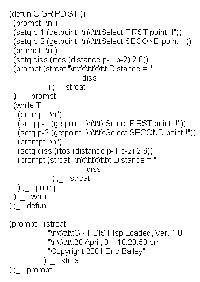
This is a perfect example of what I mean.
Really, this program is so simple. It is
the idea that is valuable. It is the idea
-- what the program does -- that took the
right combination of inventiveness and
attention to detail to create. Anyone,
knowing a little bit of AutoLISP
programming could write this routine if
they were told what the idea was. In
fact, a lot of really useful AutoLISP
routines are even fewer lines than this!
But still take that "Eureka" moment to
come up with.
This AutoLISP routine is provided at
no charge, on a "as is" basis.
|
|
Please read the
DISCLAIMER.
Click or Right-Click the link below to
download file....
GRIPDIST.lsp
|
|
|
The important "Eureka" in this case is
making the leap from noticing that grips
remained enabled when some AutoLISP
routines were run, and using that fact to
create a version of the "DISTANCE"
command that would snap the crosshairs to
enabled grips and give a very precise
distance. The fact that it is in
decimal places
even in an imperial drawing?! That is
the second "Eureka".
And note that the point of this is not to brag.
No, the point is that it is not built into
AutoCAD® -- yet.
And it is a very valuable, very useful addition
to AutoCAD®.
And all it required was someone with a little
imagination to spend a couple of minutes
creating it.
|
|
|


